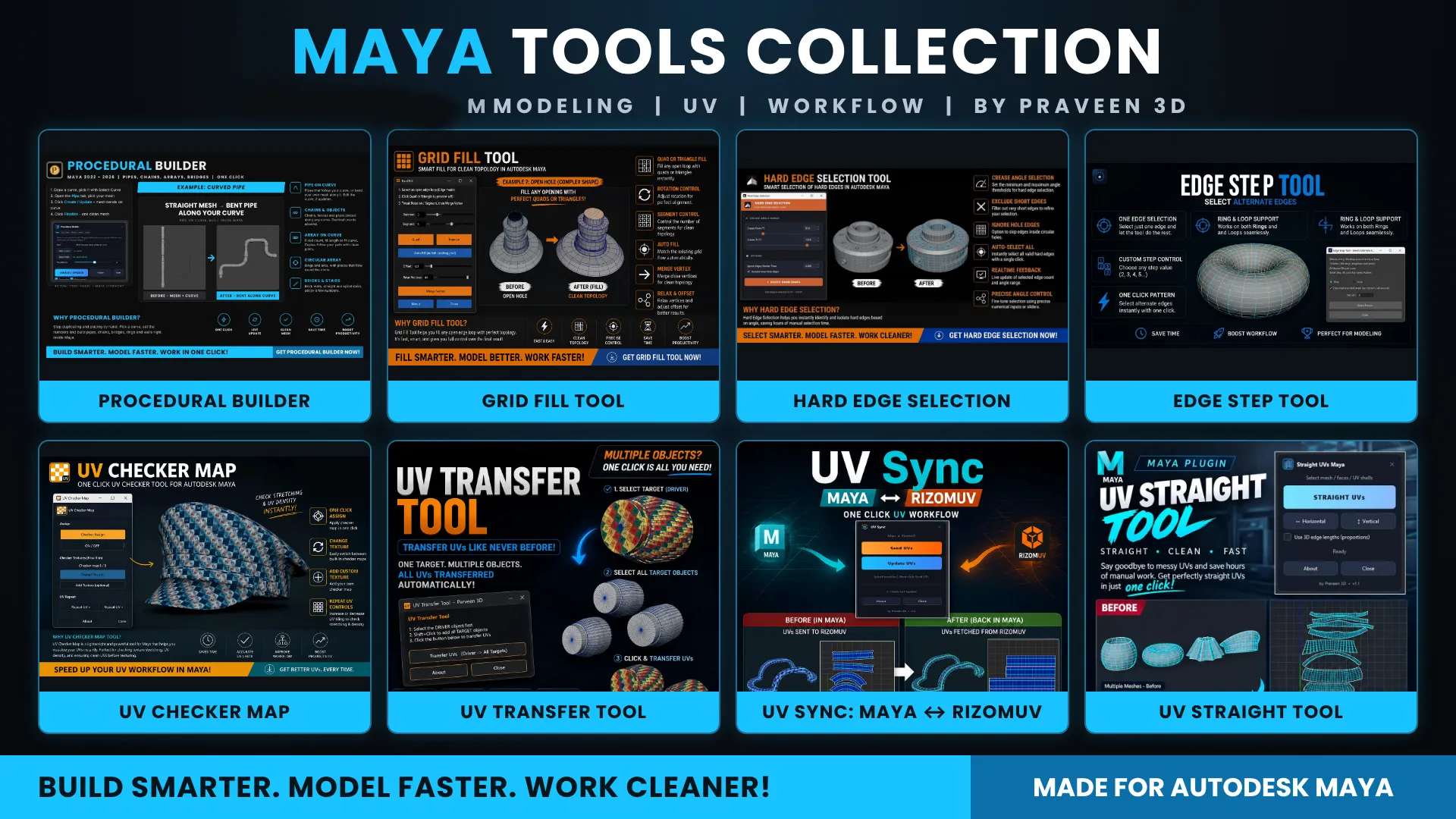
Get 10 powerful Maya tools in one bundle and make your modeling, UV, and everyday Maya workflow faster and easier
WHAT'S INCLUDEDNew GRID FILL TOOL Instead of manually filling holes and adjusting topology, Grid Fill Tool lets you quickly fill open edge loops with Quads or Triangles, preview the result live, adjust the fill, and merge it into your mesh with a single click.Whether you're working on hard-surface models, organic shapes, props, or complex topology, Grid Fill Tool helps reduce repetitive steps and keeps your modeling workflow fast and efficient.
FeaturesQuad Fill with live previewTriangle Fan FillRotation Control for adjusting fill directionSegment Control for adjusting fill densityAuto Fill to automatically match the surrounding gridOffset Control for adjusting the fill positionRelax Vertices for cleaner vertex distributionOne-click Merge Vertex to commit the fill into your meshClean and simple user interfaceLightweight and fast workflowHelps save time on repetitive topology tasks
- Straight UVs Tool Maya
Select a single mesh or multiple meshes and click STRAIGHT UVs to quickly straighten your UV shells.
The tool is designed to straighten UVs while keeping the shells clean, aligned, and unflipped. It can be used with simple strip-like shells as well as more complex bent, curved, or ring-shaped UV shells.
Features
One-click UV straightening for single or multiple meshes
Horizontal Vertical options to control the straightening direction
Works with single or multiple UV shells
Clean and simple UI designed for a fast workflow
Custom Maya shelf button included
Easy drag-and-drop installation
No additional software required everything works directly inside Maya
For Multi-User License details, contact Parveen
- Multiple UV Transfer Tool
Speed up your UV workflow in Autodesk Maya with the UV Transfer Tool.
Instead of manually unwrapping every identical object, simply unwrap a single Driver Object, select all Target Objects, and transfer the UVs to all of them with just one click.
Perfect for scenes with repeated assets such as pillars, chairs, helmets, props, modular environment pieces, and other duplicate meshes, helping you save time and eliminate repetitive UV work.
Features
One-click UV transferTransfer UVs from one Driver Object to multiple Target ObjectsSave hours of repetitive UV workSimple and beginner-friendly workflowFast installation with automatic shelf button
- New UV Sync One Click Maya RizomUV Workflow
Speed up your UV workflow with UV Sync, a one-click bridge between Autodesk Maya and RizomUV.
Instead of manually exporting and importing OBJ files every time you edit UVs, UV Sync lets you transfer your meshes directly from Maya to RizomUV, edit your UVs, and bring them back to Maya with a single click.
Whether you're packing UVs, straightening shells, optimizing layouts, or making any other UV edits, UV Sync removes repetitive steps and keeps your workflow fast and efficient.
Features
One-click Send UVs from Maya to RizomUVOne-click Fetch updated UVs back into MayaSupports single and multiple mesh workflowsPreserves vertex order and face orderTransfers only UV data while keeping your original geometry intactNo manual OBJ export/import workflowAutomatically opens RizomUV (if installed)Clean and simple interfaceLightweight and fastSaves time on repetitive production tasks
- Edge Step Tool Select Alternate Edge
A fast, reliable edge ring/loop step-selector tool for Autodesk Maya.
What it does
Select every Nth edge along a ring or loop e.g. every alternate edge
Extend selections into full top-to-bottom all-around stripes
One-click selection no manual repeats, no guesswork
- UV Checker Map Tool
Speed up your UV workflow with the UV Checker Map Tool for Autodesk Maya. Instead of manually creating and assigning checker materials every time you want to inspect your UVs, this tool lets you do it with a single click.
It is designed to help 3D artists quickly check UV stretching, UV density, and overall UV quality before texturing. Whether you're creating assets for games, animation, or product visualization, this tool makes UV inspection faster and more convenient.
The tool comes with 8 built-in checker map textures, so there's no need to manually create checker materials every time. You can also add your own custom checker maps, and they will be saved automatically for future use.
Features
One-click Checker Map assignment8 built-in Checker Map texturesEasily switch between checker texturesAdd your own custom checker mapsEnable or disable the checker map instantlyRepeat UV controls to increase or decrease UV tilingQuickly inspect UV stretching and UV densityClean, lightweight, and easy-to-use interfaceWorks with Autodesk MayaPERFECT FOR:
Game Artists Hard-Surface Artists Prop Artists Environment Artists 3D Generalists Product Visualization Artists
- Procedural Builder Tool Maya
Stop duplicating and placing by hand
Procedural Builder builds the repetitive parts of your modeling for you. Pick a curve or a mesh, set a few numbers and press Create / Update. You get a live preview that updates while you change anything. Edit the curve later and the result follows it. When you are happy, press Finalize and it becomes normal, clean Maya geometry.
5 tools in one window
PIPE
Select a curve and get one smooth, continuous pipe that follows it exactly.Choose hollow or solid, number of sides and closed ends. The radius is picked automatically.Or select your own mesh cylinder, pipe, cable, rope and bend it along the curve. Its thickness stays the same.Move the curve points and the pipe follows.ON CURVE
Place any object along a curve: chain links, fence posts, lamps, rocks, rails.Set the count even decimals and copies can bend to follow the curve or stay rigid.Randomize rotation, scale and position. Drop objects onto a terrain surface.ARRAY
Fixed Count, Fit Length, Fit Curve or Circular.Copies follow your curve with clean joints, for bridges, rails, fences and more.Relative offset, bend segments, and circular arrays for rings and arcs.BRICKS
Brick walls from a few numbers: wall size, brick size, mortar gap.Patterns: running, stack, one-third, flemish. Randomize with a seed.Optional: every brick as its own object.STAIRS
Straight stairs from height, width, steps and step depth. Step height is worked out for you.Landing and thin steps options.
- Hard Edge Selection
Speed up your modeling cleanup workflow with Hard Edge Selection for Autodesk Maya.
Instead of manually clicking through edges to mark creases or hard-surface breaks, Hard Edge Selection lets you instantly select all hard edges on your mesh based on a crease angle range, with live feedback and one click.
Whether you're working on hard-surface models, mechanical parts, props, or complex topology, Hard Edge Selection helps reduce repetitive edge-picking and keeps your modeling workflow fast and clean.
- NGon Fixer
NGon Fixer is a Maya modeling tool that finds every n-gon in your model and converts it into clean, even quads in just two clicks. No manual cutting, no loop-by-loop cleanup.
It works on spheres, cylinders, torus, cubes and complex shapes, and the new quads follow your surface curvature and the edge flow around them.
- Blender Bridge
Blender Bridge Maya to Blender in One Click
BLENDER BRIDGE Maya Blender, in One ClickNo more hassle of exporting and importing OBJ or FBX files. Blender Bridge connects Autodesk Maya and Blender with just two buttons: SEND MODEL and FETCH MODEL.WHAT DOES THIS TOOL DO?Have a model in Maya but want to sculpt or continue modeling in Blender? Just click Send.Do whatever you want in Blender — modeling, editing, sculpting, Grid Fill, Array, Relax, Smoothing, Curves, Bevel, Tissue Modifier, and more.Press Ctrl+S in Blender, then click Fetch in Maya. All changes made in Blender are transferred back to the same Maya object, preserving its Maya name, transforms, and hierarchy.If you rename an object in Blender, the updated name will also appear in Maya's Outliner.Combine the power of Maya and Blender in a single workflow!
UDIM Texture AssignerAfter exporting textures from Substance Painter, applying them in Maya can be a long and tedious process. You have to create each material separately, create a file node for every texture map, connect each map to the correct slot, and then select faces according to each UDIM tile to assign the materials.To make this process easier, I created the UDIM Texture Assigner. Simply select your model, choose the texture folder, and click Assign Textures. The tool handles everything automatically.Designed for Arnold (aiStandardSurface).
PatternWeaver for Maya
PatternWeaver for Maya – Create Patterns on Any Mesh in One Click Select your base mesh and tile, and Pattern Weaver will fill every face with the tile. Perfect for baskets, weaves, grilles, scales, and panels.What You Can Create• Woven baskets, wicker, and rattan• Metal grilles, vents, and mesh panels• Armor, creature skin, and wall scales or tile patterns• Fabric weaves and panel patterns• Repeating details on any curved or hard-surface shape4 Controls and What They Do• Rotation: Rotates the tile in 90° steps. This changes the direction of the weave.• Pattern: Determines how the tiles alternate across the surface. This allows for either a basket-like weave or a straight grid.• Scale: Makes the tile larger or smaller.• Distance: Opens or closes the gap between tiles. Closing the gap makes the tiles merge together.
Autodesk Maya 2022–2026 Supported
The Tools have been Fully Tested on Maya 2023