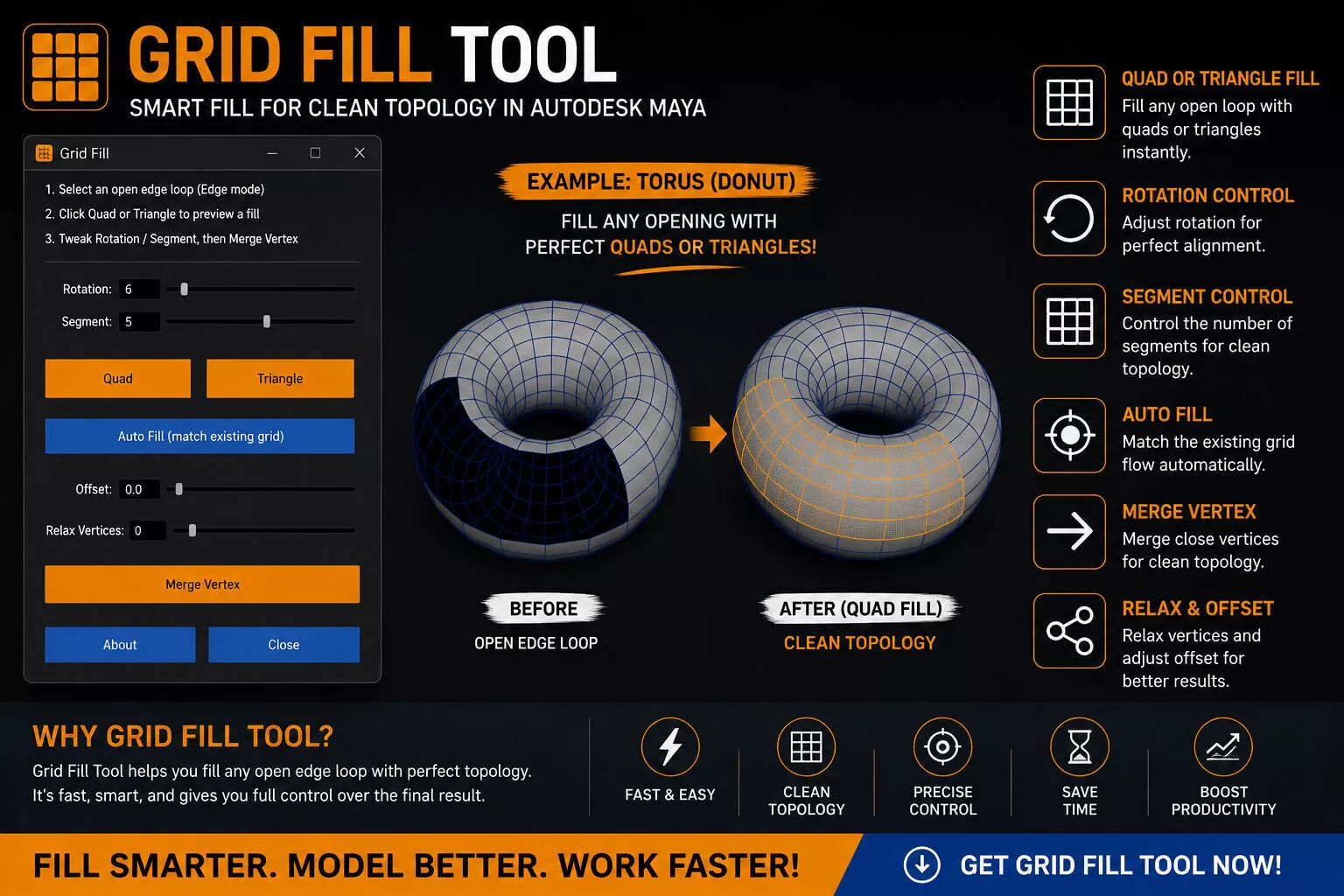
Speed up your modeling workflow with Grid Fill Tool for Autodesk Maya.
Instead of manually filling holes and adjusting topology, Grid Fill Tool lets you quickly fill open edge loops with Quads or Triangles, preview the result live, adjust the fill, and merge it into your mesh with a single click.
Whether you're working on hard-surface models, organic shapes, props, or complex topology, Grid Fill Tool helps reduce repetitive steps and keeps your modeling workflow fast and efficient.
FeaturesQuad Fill with live previewTriangle Fan FillRotation Control for adjusting fill directionSegment Control for adjusting fill densityAuto Fill to automatically match the surrounding gridOffset Control for adjusting the fill positionRelax Vertices for cleaner vertex distributionOne-click Merge Vertex to commit the fill into your meshClean and simple user interfaceLightweight and fast workflowHelps save time on repetitive topology tasksPerfect ForGame ArtistsHard-Surface ModelersProp Artists3D GeneralistsAutodesk Maya UsersAnyone who regularly works with open edge loops and topologyRequirementsAutodesk Maya 2021–2026Tested on Maya 2023Python 2.7 / Python 3 support depending on the Maya versionNote: Maya 2023 is the version individually tested by the developer. Compatibility with other listed Maya versions is based on the tool's intended version support and has not been individually verified on every version.
IncludedGrid Fill Tool Script / InstallerInstallation Guide & DocumentationStep-by-step Installation VideoHow It WorksSelect an open edge loop in Edge Mode.Open Grid Fill Tool from your Maya shelf.Choose Quad or Triangle.Adjust Rotation and Segments while viewing the live preview.Use Auto Fill, Offset, or Relax Vertices when needed.Click Merge Vertex to commit the result to your mesh.
Spend less time fixing holes and more time creating better models. Let Grid Fill Tool handle the repetitive topology work so you can focus on your art.