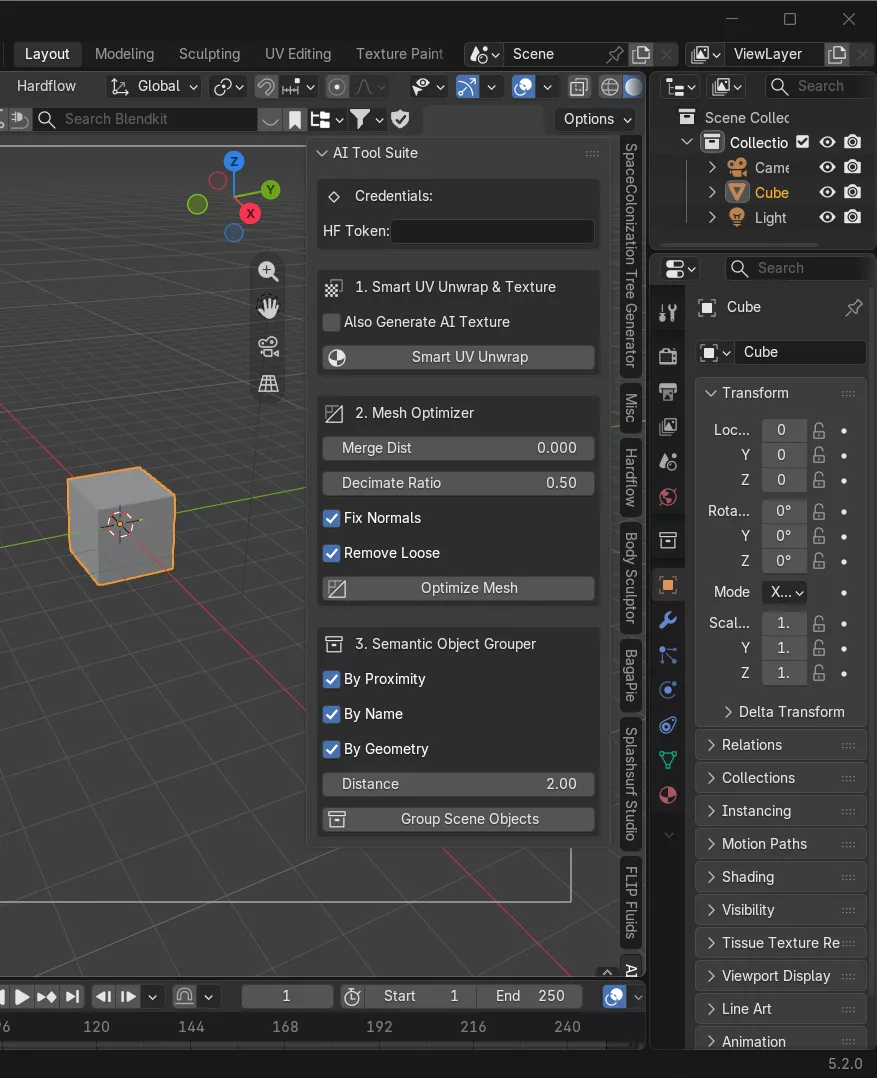
The AI-Powered Tool Suite for Blender is a collection of intelligent tools designed to eliminate the most time-consuming parts of your 3D workflow. Built by a 3D designer with 12 years of professional experience, this suite uses AI to automate the tasks everyone hates doing — UV unwrapping, mesh cleanup, and object organization.Whether you're a solo creator, a studio artist, or a freelancer juggling multiple projects, these tools will save you hours of manual work on every single model. FEATURES: Smart UV Unwrapping • AI-driven UV seam placement that analyzes mesh topology and curvature • Automatically minimizes stretching and distortion • Reduces UV islands intelligently based on surface flow • Works on complex organic meshes AND hard surface models • No more manually placing seams and praying the unwrap doesn't look like garbage
Mesh Optimization • Detects and removes unnecessary geometry without destroying detail • Smart decimation that preserves silhouette and important features • Identifies and fixes common mesh problems (NGons, overlapping verts, bad topology) • Adjustable optimization levels — from light cleanup to aggressive reduction • Real-time preview before committing changes
Semantic Object Grouping • AI analyzes scene objects and groups them by logical categories • Automatically names and organizes your outliner hierarchy • Detects relationships between objects (parent/child, symmetrical pairs, kits) • One-click scene organization instead of manually sorting hundreds of objects • Custom naming conventions supported
WHO IS THIS FOR? • 3D artists tired of spending more time on cleanup than actual creation • Freelancers who need to deliver clean models fast • Game developers importing assets into engines who need clean UVs and optimized meshes • Studio pipelines that want to automate repetitive prep work • Anyone who has ever stared at a 200,000-tri mesh and thought I do NOT want to unwrap this by hand
REQUIREMENTS: • Blender 3.6+ (recommended 4.0+) • Internet connection for AI processing • Windows, macOS, or Linux
INSTALLATION:Download the .py file after purchaseIn Blender, go to Edit > Preferences > Add-onsClick Install... and select the downloaded .pyEnable the add-onFind the AI Tool Suite panel in your N-menu sidebarFAQ: Q: Does this work offline? A: The AI features require an internet connection for processing, but basic tools work offline.Q: Will it work on my machine? A: If you can run Blender, you can run this. The AI processing is handled server-side, so it won't tax your hardware.Q: Is this a subscription? A: No — one-time purchase. Free updates included for the current major version.Q: Can I use this commercially? A: Yes. Commercial use is fully supported. Models processed with these tools are yours to use however you want.