




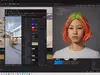

FBX
This FBX file has successfully passed the CGT Standard technical and visual checks. The verification results are detailed in the section below.
File & scene
Binary FBX
Binary FBX file is more compact and faster to load and process.
Learn more
Learn more
No unsupported objects
Unsupported objects:
- Lights
- Cameras
Learn more
- Lights
- Cameras
Learn more
Geometry
No N-gons
N-gons are polygons with five or more sides which might cause issues in certain processes like rendering or animation. Learn more
No faceted geometry
Faceted geometry uses flat surfaces without smoothing, which can look unrealistic on curves.
Learn more
Learn more
Manifold geometry
Manifold geometry ensures all surfaces are properly connected, avoiding issues like edges shared by more than two faces.
Learn more
Learn more
Textures & material
PBR textures
PBR textures simulate how light interacts with materials, making the model look realistic under different lighting.
Required PBR textures:
- Base Color
- Roughness
- Metalness
- Normal
Learn more
Required PBR textures:
- Base Color
- Roughness
- Metalness
- Normal
Learn more
No embed textures
Embedded textures are stored inside the model file, increasing its size and sometimes causing compatibility issues.
Learn more
Learn more
Square textures
Texture aspect ratio is the width-to-height ratio of a texture. Expected texture aspect ratio: 1:1
Learn more
Learn more
Power of 2 texture sizes
Textures with dimensions in power of two (e.g. 512x512px, 1024x1024px) are used to optimize performance and memory usage.
Learn more
Learn more
Assigned materials
Materials are applied to the 3D model to allow visualize a model's surface properties and appearance.
Learn more
Learn more
UVs & naming
No UV overlaps
UVs overlap when multiple points on the 3D model's surface are mapped to the same point on the UV island causing texture stretching.
Learn more
Learn more
UV unwrapped model
A UV unwrapped model means its 3D surface is flattened into 2D space, allowing textures to be applied accurately.
Learn more
Learn more
Allowed characters
Allowed ASCII characters: a-zA-Z0-9-_
Learn more
Learn more