25 Jun 2026
Tips & Insights
A thumbnail will tell you what a model looks like. But what it won't tell you is whether the topology is clean, the UVs are properly laid out, or if the file will import without issues. Those things only become visible once you're already inside the project.
CGT Standard is the filter that answers those questions before you buy. It covers four technical areas that determine whether an FBX model is consistently structured and ready to use in a real pipeline. With over 2.8 million 3D models on CGTrader's marketplace, CGT Standard is the standardization system that saves you time and helps you source FBX assets with confidence.
Here's the full picture on what it means.
CGT Standard is CGTrader's standardization system specifically for FBX 3D models, the universal, industry-standard 3D file format developed by Autodesk. Models that carry the badge have been validated against a specific set of technical requirements: file and scene structure, geometry, textures and materials, and UVs and naming.
The verification is automated. This means when a designer uploads an FBX model, it's run through a validation tool that checks it against the technical requirements, and if all are met, the model gets the badge.
It's a technical standard, telling you that the FBX file has been built and organized to a consistent baseline, against the same criteria, so it behaves predictably when you import it.
Want to see exactly how verification works from the creator's side? Watch the full tutorial below:
CGT Standard validates four technical areas. Together, they determine whether an FBX model is consistently structured and ready to drop into a real project, not just visually convincing in a preview. Here's what each one means for you.
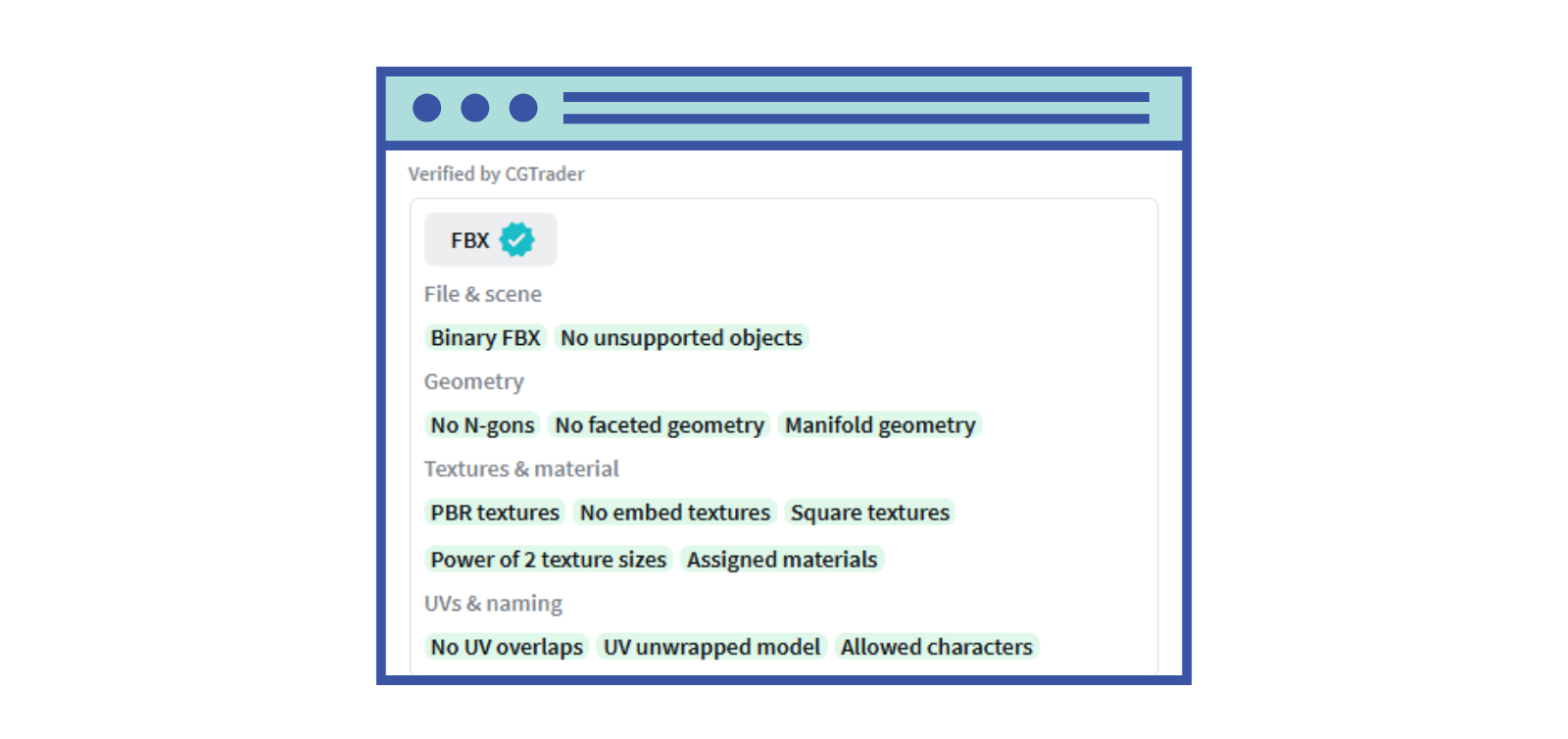
The validation starts with the file itself. The model must be delivered as a binary FBX: the format that ensures compatibility across software, and must contain no unsupported objects that could cause import errors. CGT Standard scene requirements mean the file is clean and predictable before you've even opened it.
For you as a buyer: no format surprises, no stray objects, no import failures on the first try.
CGT Standard geometry requirements check three specific issues that cause problems downstream. N-gons (polygons with more than four sides) are flagged because they can cause unpredictable results in subdivision and rendering. Faceted geometry, where surfaces appear hard-edged when they should be smooth, is also checked. And the model must have manifold geometry: a clean, closed surface with no edges shared by more than two faces and no disconnected vertices.
In practice: the model renders and behaves the way it looks in the preview, without geometry-level errors surfacing mid-project.
CGT Standard texture and material requirements validate five things: textures use PBR (Physically-Based Rendering) workflows; textures are not embedded inside the FBX file itself (keeping file sizes manageable and textures editable); texture dimensions are square; sizes follow power-of-2 values (512, 1024, 2048, 4096) for compatibility with game engines and real-time renderers; and all materials are properly assigned to the geometry.
For you as a buyer: the model responds to lighting realistically, textures are easy to locate and swap, and the file is optimized for the software you're working in.
UV mapping is how a 3D surface gets "unwrapped" so textures can be applied accurately. CGT Standard UV requirements check that the model is fully UV unwrapped and that UV islands don't overlap, which would cause textures to appear incorrectly on the surface. Naming requirements validate that meshes, materials, and textures use only allowed characters, making the file readable and portable across different software environments.
For you as a buyer: textures appear exactly as intended, with no stretching or misaligned detail — and the file structure is clean enough to navigate and hand off.
.png)
The checks above tell you what CGT Standard validates. Here's what that translates to once the file is in your hands.
Less time on cleanup, more time on the actual work. The most common reason 3D assets slow down a pipeline isn't that they look wrong, it's that they need fixing before they can be used. Bad geometry, broken UVs, missing texture assignments. CGT Standard FBX models are validated before they reach you, which means that time stays in your project budget, not your prep work.
Predictable behavior across software. CGT Standard models are structured for cross-platform compatibility. Binary FBX format, power-of-2 textures, allowed naming characters, no unsupported objects, whether you're importing into Blender, Maya, Unreal, Unity, or a proprietary pipeline, the model is set up to behave the way you expect.
Confidence when sourcing at volume. If you're a studio or freelancer pulling multiple assets for a single project, inconsistency across files compounds quickly. A CGT Standard filter gives you a consistent technical baseline across everything you download, so you're not re-evaluating file structure on every single listing.
A better foundation if you need to customize. Clean geometry, logical UV layout, unembedded textures, and proper naming all make a model significantly easier to modify. If you need to swap textures, adjust geometry, or integrate the asset into a larger scene, CGT Standard models are structured to accommodate that.
Use the CGT Standard filter in the search sidebar when browsing CGTrader's 3D model library. Enable it and your results will show only verified models. You'll also see the CGT Standard badge displayed directly on qualifying listing pages.
.png)
If you're new to buying 3D models and want a walkthrough of how to evaluate and source assets for your projects, this video is a great starting point:




Comments